Documentation
Section author: Simeon Ehrig, Axel Huebl
In the following section, we explain how you can contribute to this documentation.
The documentation consists of two main parts. The first part is a manual-styled documentation that contains text blocks, images, and other media. The second part is the API documentation.
Documentation Kinds
Manuel Documentation
We use Sphinx Doc for manual-style documentation and host the rendered documentation at https://readthedocs.com.
If you are reading the HTML version and want to improve or correct existing pages, check the “Edit on GitHub” link on the right upper corner of each document.
Alternatively, go to docs/source in our source code and follow the directory structure of reStructuredText (.rst) files there.
For intrusive changes, like structural changes to chapters, please open an issue to discuss them beforehand.
API documentation
The API documentation is generated in the source code using Doxygen via source code comments. The Doxygen documentation is automatically generated as part of the Sphinx documentation.
If you would like to improve the API documentation, please fork the project, improve the documentation, and open a pull request.
Preview
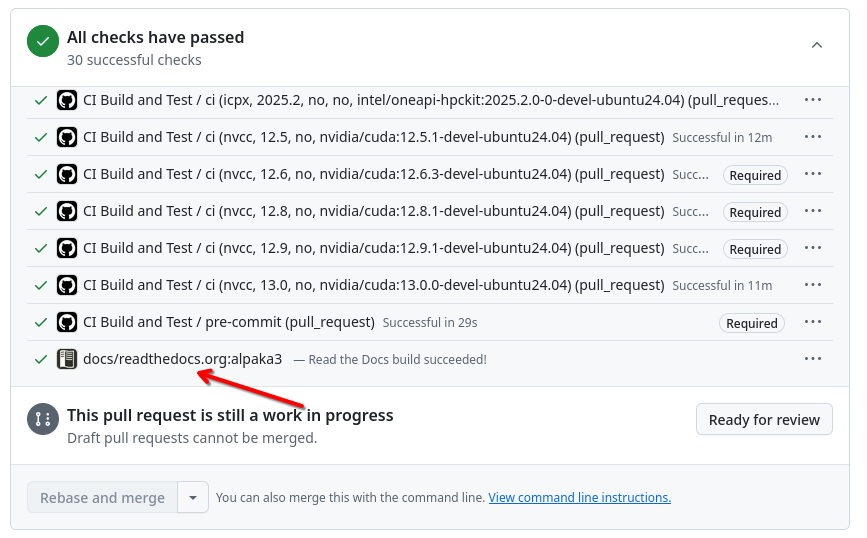
As part of a pull request, the manual and API documentation are created and made available on a temporary website. The preview can be accessed via the CI job link.
Build Locally
Sphinx Doc is a Python software. Therefore, it is strongly recommended that you create a Python environment to generate the documentation.
The following example shows how to set up a virtual Python environment for Sphinx Doc and generate the documentation.
Install all dependencies:
python3 -m venv alpaka-doc-env
# activate environment
source alpaka-doc-env/bin/activate
cd docs
# install dependencies
pip3 install -r requirements.txt
# install doxygen
curl https://www.doxygen.nl/files/doxygen-1.16.0.linux.bin.tar.gz -o /tmp/doxygen.tar.gz
tar -xf /tmp/doxygen.tar.gz -C /tmp/
cp /tmp/doxygen-1.16.0/bin/doxygen $VIRTUAL_ENV/bin
Build documentation:
# activate environment
source alpaka-doc-env/bin/activate
cd docs
# build documentation
make html
# chromium and other browser also works
firefox ./build/html/index.html